This feature is exclusive to Pro and Advanced plan subscribers.
Once a client places an order for Digital Download products, they will have 30 days to download the order through the order's download page.
If you've enabled Pending Order Approval, the 30 days will start when you approved the order.
After the 30 days, it will no longer be possible for the client to download the images from the order.
If needed, you can re-enable the download for another 30 days. Doing so will also automatically send the client a new email with the link to the order's download page.
Extending Digital Download Orders and Re-sending the Email
This is done through the Sales Reports page in the Dashboard.
- In your account, click on Selling in the menu across the top.
- Click on View Reports in Reports & Payouts.
- Click on the Orders tab to view recently placed orders or search for the order using the search field.
- Once you've located the order, click on the order to open it. Review the order and make sure that the images that were ordered are still available.
- Click on Extend Availability to 30 Days from Today.
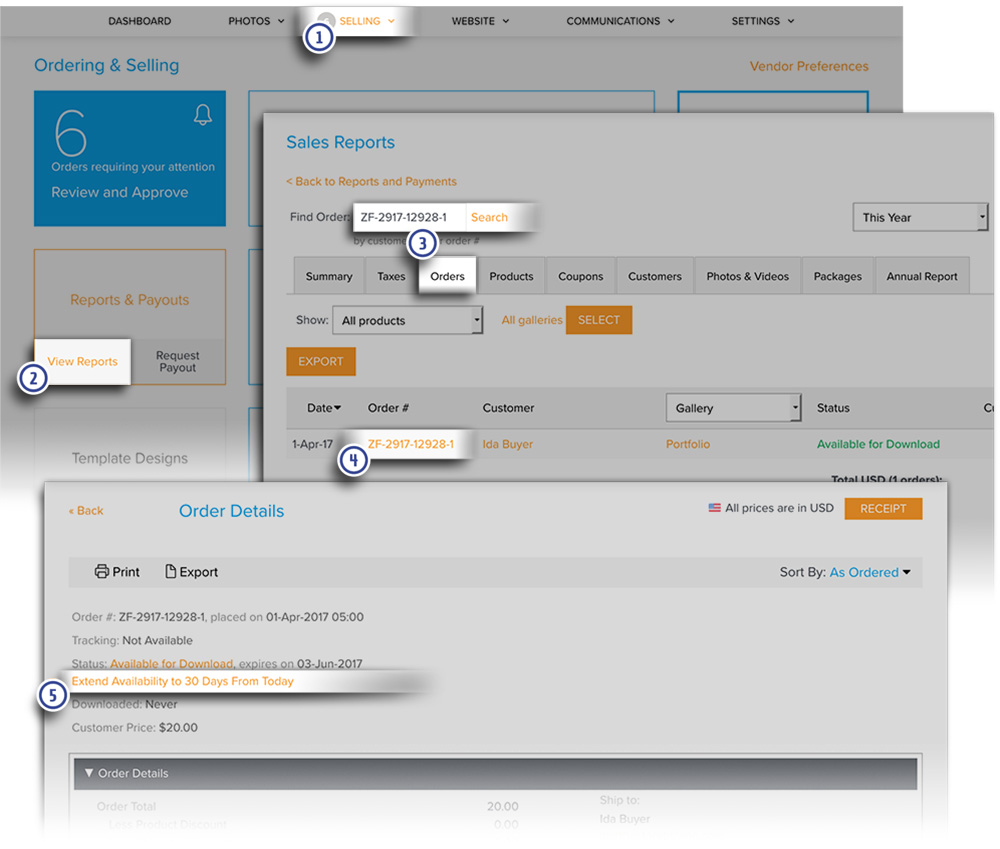
The screen will refresh once this is completed. The download expiration date will update to the new expiration date that is 30 days from when the order was extended. This will verify that the extension has been completed.
An email will be automatically sent to the client letting them know that the order has been extended. The link to the order's download page will be included in the email. You will also receive a copy of the email.
Deleted Images
Please note that it will not be possible to reactivate and extend the digital order if the images in the order have been deleted from the account by the photographer.
Please review the order details and make sure that the images are still in the account.